Showing posts with label cell phone. Show all posts

Video Chat - Skype vs Tango

Last week when i went out of town, Karrie and i decided to try out video chat. Just like in every sci-fi movie of the future, where people don't just talk on the phone, but also see the persons face. We decided to try both Skype and Tango, the two most popular video chat programs.

skype, video chat, logo, app, download VS. tango, video chat, online, app, program, download, cell phone, logo

When comparing the two i realized that the program for the PC was not the same as the mobile version for the cell phone. So i came out with two different results:


Video Chat using a Computer
If you have a microphone and you are using you computer or laptop, then the winner is:
skype, video chat, logo
Skype had lots of features and easy to use. When you run the program on your computer, you are able to clearly see all of those features and understand how everything works. But you have to make sure you have a webcam and microphone. Some laptops now come with those built in.
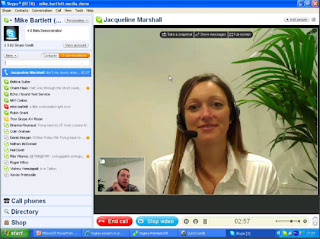
skype screenshot, screen shot, interface, address book, face, video chat


Video Chat using a Cell Phone
If you are planning on using video chat with a cell phone, then the winner is:
tango video chat, logo
When you are using a cell phone you don't need lots of features. In fact it's a lot easier to use an app with a simple interface. No clutter no fancy options, just turn it on, call and video talk. With a small cell phone screen, it's not easy to see and use all of the buttons. That's why i liked Tango's interface better.
tango video chat screen shot, screenshot, cell phone, address book, call

So if you are looking to try out video chat with your family and friends, the program you want depends on whether you will be using your computer or cell phone. I would think that the majority of people now a days would be using their cell phone. In that case i would recommend connecting to a wi-fi first. It takes a lot of bandwidth to transfer live video. If you have a bad connection, the video can get really choppy. Also your phone needs to have a forward facing camera, otherwise you won't be able to see the person you are talking to, and sort of ruins the whole point.

DIY Cell Phone Holder - For Your Car

The other day on Lifehacker i saw how you could make a car cell phone holder out of a binder clip. It's used to hold your phone up while driving in the car.

I basically followed the same directions. But after bending the wires i decided to wrap them with yarn instead. And then so the phone didn't slip, i used Goop glue, which has similar consistency as rubber cement or hot glue.
DIY Cell Phone Holder, For Your Car
It held the phone better then i thought it would.
make Cell Phone Holder, Binder Clip
free Cell Phone Holder
So i tried it out while driving in the car and it worked fine. But it does depend what you are clipping on to. All i had in my car was the thin air vent, which didn't give much support and the phone wobbled a little.
how to make a Cell Phone Holder for your car
But overall i think it worked really well.
Cell phone Holder for your Car
It's a cheap and easy way to see if you like using a phone clip, before buying a fancy, expensive one.
Cell phone Holder for your Car, clip, binder, free

Free Online Music

Here are 3 ways to listen to music online. The first two are super easy, you'll have songs playing within 5 seconds.
Pandora Radio
This site has you type in a song or band that you like and it plays music that is similar. It's a great way to discover new bands that play the same type of music you already like. The downside is that you cannot pick particular songs and it only lets you skip a few songs at a time. It's sort of like a radio station tailored to you.
pandora, online radio, music, screenshot

Grooveshark
This is similar to Pandora except it's better. It lets you pick the exact song you want to listen to, see every song from any band and make playlists to listen to. I first learned about it when i saw that Grooveshark had several lawsuits against it and the Android App store refused to support it. I knew it must be good if that many companies hate it.
grooveshark, free music online, screenshot, any song

Google Music Beta
This is brand new. It came out last Tuesday. It's only in Beta version and you need an invite to even use it. Apparently you will be able to load all your music online then be able to listen to it anytime from any device.
google music, beta, upload music, access anywhere

Powered by Blogger.